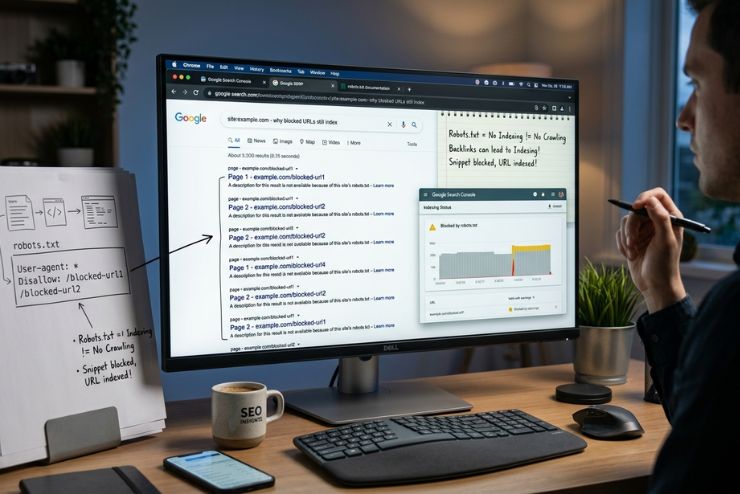
You blocked a page in robots.txt. Then confirmed it. You even tested it in Google’s robots.txt tester. Yet days later, that same URL shows up in Google’s search results sometimes with a strange, blank-looking snippet. If you’ve stared at Search Console wondering if something’s broken, you’re not alone. This is one of the most common points of confusion in technical SEO, and it trips up beginners and experienced marketers alike.
The good news: it’s not a bug, it’s how robots.txt was intended to function from the beginning, and the mystery vanishes once you complete the technique. This article breaks down exactly why this happens and what you can do about it.
Robots.txt Blocks Crawling, Not Indexing

This is the single most misunderstood rule in SEO: robots.txt tells Google’s crawler not to visit a page. It does not tell Google to keep that page out of the search index.
A robots.txt stops crawling, however, Google can still index pages that links to the restructured URL with the descriptive content, according to Google’s own guidelines. the URL without ever visiting it. [Source: Google Search Central].
In other words, Google can learn if a page exists and even show it in search results purely from links pointing to it, without ever reading the page’s actual content.
💡 Quick Fact
The robots exclusion protocol, a voluntary standard first put forth in 1994, is respected by Googlebot, the company crawler. The principles behind robots.txt are more recent and formal than most people understand because it was not until 2022 that it became an official Internet Engineering Task Force (IETF) standard (RFC 9309).
Why This Standard Creates the ‘Blank Snippet’ Problem
A warning such as “no information is available for this page” is frequently displayed when a blacked URL shows up in search results. This is because Google was never permitted to access the URL title, meta description, or content, even though it is aware that it exists.
Usually, this occurs when
•Anchor text is used in external or internal links to direct users to the banned URL.
•Google hasn’t completely removed the page yet, as it was indexed prior to robots.txt blocking it.
•The URL is still included in a sitemap, indicating to Google that the page is significant enough to be tracked.
Robots.txt errors are among the most common technical SEO problems detected on commercial websites, according to the 2023 research by the SEO company Ahrefs. This misconfigurations frequently results in indexing confusion.
How To Actually Learn From Search Results
Robotx.txt is not the right strategy if your true objective is to keep a page completely off Google. Rather, it functions as follows.
1. Make use of a no-index meta tag
By including the meta name in the HTML of the website, Google is explicitly told not to display this page in the search results. It must not be concurrently blacklisted in robots.txt because this only works if Google can crawl this page.
2. Temporarily remove the block rule
Unblock a page long enough for Google to crawl it, notice that it has no index tag, and remove it from the index if it has been previously banned and indexed. If necessary, you can then reblock it.
3. Use Search Console’s URL Removal Tool
The tool offers a temporary fix (about six months) while your permanent noindex solution takes effect. Google explicitly recommends pairing the removal tool with noindex for lasting results. [Source: Google Search Central].
Conclusion
It is simple to confuse robots.txt with no index since they address two distinct issues. Robots.txt manages crawling how Googlebot spends its time on your site. Noindex manages visibility, whether a page can appear in search results at all. Once you separate these two concepts, the “mystery” of blocked URLs showing up in search stops being confusing and starts being predictable.
If you take one thing from this article, let it be this: If you truly want a page gone from Google, let Googlebot see the no-index tag. Don’t block the door and expect the page to disappear.
Frequently Asked Questions (FAQs)
No, Robots.txt does not secure or conceal content; it only asks complying crawlers to skip a page. It is accessible to the public. Robots.txt should not be used to protect sensitive data; authentication should.
This status indicates that Google did not crawl the URL’s content and instead uses external signals (such as links) to index it. It’s a direct, expected outcome of how the protocol works, not an error.
Depending upon how frequently Google scans your website, removal of a valid noindex tag usually takes a few days to a few weeks.